
Overview
ATLAS provides specialized trainer classes for different training paradigms. Each trainer extends HuggingFace’s base trainer with RL-specific capabilities.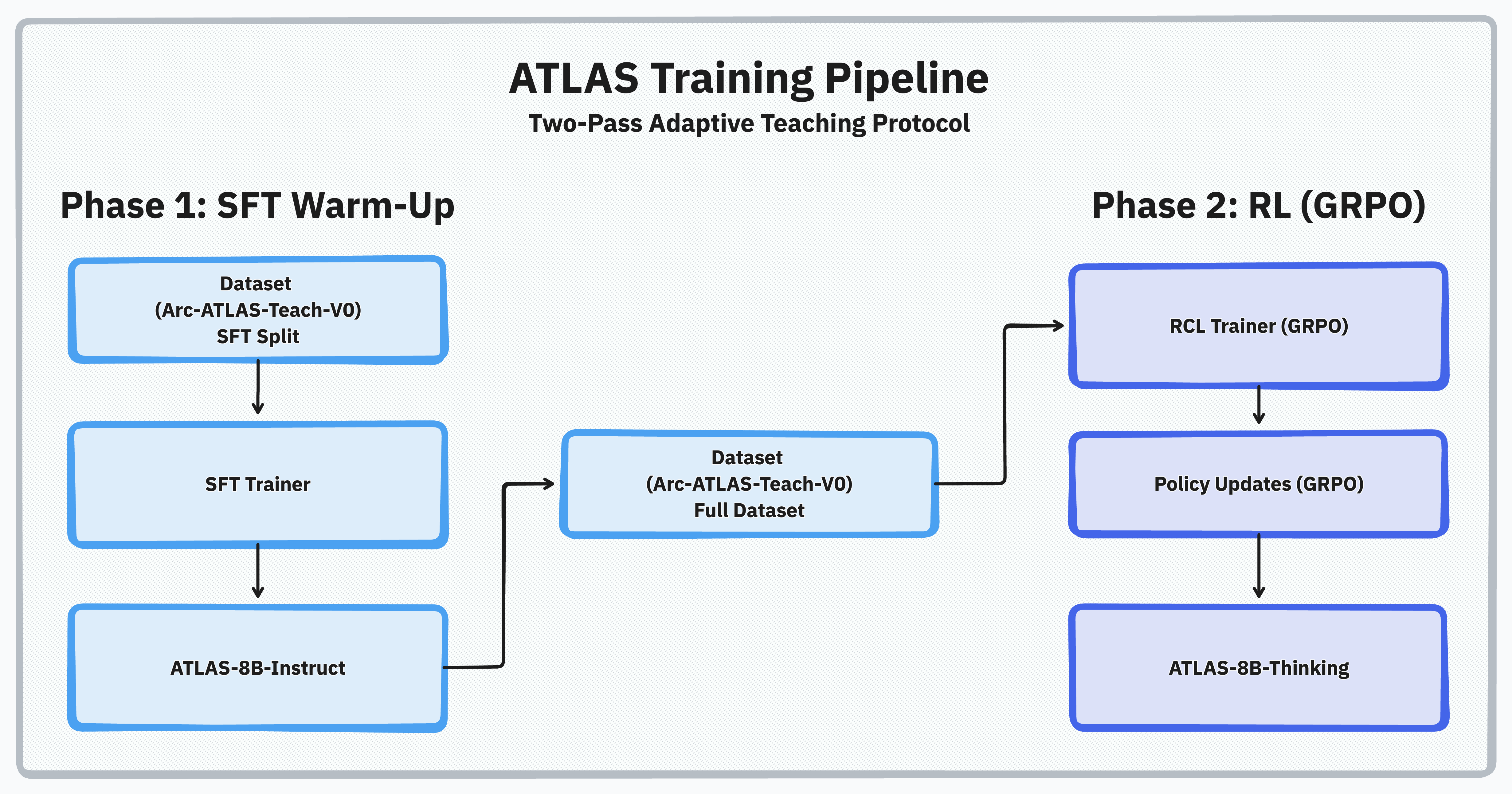
Typical Usage
GRPOTrainer
Main trainer for Group Relative Policy Optimization.Class Overview
GRPOTrainer is the main trainer class for Group Relative Policy Optimization, extending the standard HuggingFace Trainer with reinforcement learning capabilities.Parameters
Parameters
Key Features
Key Features
GRPO Training Loop: Implements the complete reinforcement learning training process with policy gradient optimization and KL divergence constraints.Generation Support: Supports both local generation and distributed generation via vLLM server integration.Memory Management: Includes optimizations for training large models with gradient checkpointing and model offloading.Reward Composition: Handles multiple reward functions (including optional RIM-based scoring) and reward weighting for complex optimization objectives.Implementation: See
src/atlas_core/training/algorithms/grpo.py for complete method signatures and implementation details.Training Hooks
Training Hooks
Override these methods for custom behavior:
src/atlas_core/training/algorithms/grpo.py
TeacherGRPOTrainer
Specialized trainer for adaptive dual-agent teaching (student agent + verifying teacher).Class Overview
TeacherGRPOTrainer extends GRPOTrainer to implement the two-pass teaching protocol. From the actual source code (src/atlas_core/training/algorithms/teacher_trainers.py), this trainer:
- Inherits from both
GRPOTrainerandTeacherTrainer - Accepts
student_modelparameter in constructor - Implements diagnostic probing and verifying-teacher guidance templates
- Manages both teacher and student models during training
Unique Methods
Unique Methods
Teaching Protocol
Teaching Protocol
The two-pass protocol implementation:
Reward System Integration
TeacherGRPOTrainer expectsreward_funcs to supply the evaluation signal. When you pass an instance of RIMReward, each call returns both the aggregated reward and an information dictionary containing per-judge scores, principles, and rationales. The trainer logs these details under rim_rewards and rim_explanations, making it possible to inspect accuracy, helpfulness, process, and diagnostic scores separately. To switch configurations during an experiment, update the Hydra override so that RIMReward loads either reward_system/interpretation.yaml or reward_system/interpretation_offline.yaml. The trainer does not need any code changes when you modify judge prompts, thresholds, or model choices.
Source: src/atlas_core/training/algorithms/teacher_trainers.py
SFTTrainer
Supervised fine-tuning trainer for warmup before RL.Constructor
Key Features
Key Features
- Sequence packing: Efficient batching of variable-length sequences
- Custom formatting: Apply templates to raw data
- Gradient accumulation: Handle large effective batch sizes
- Mixed precision: FP16/BF16 training support
SFTTrainer
Custom Trainer Implementation
Create your own trainer by extending base classes:Callbacks and Monitoring
Available Callbacks
Custom Metrics
Distributed Training
Multi-GPU Setup
DeepSpeed Integration
Atlas Core relies on Accelerate configs to enable DeepSpeed. Use one of the presets inaccelerate/:
Implementation Notes
ATLAS trainers extend standard HuggingFace Trainer classes with RL-specific functionality. The implementation details can be found in:src/atlas_core/training/algorithms/grpo.py- Main GRPO trainer implementationsrc/atlas_core/training/algorithms/teacher_trainers.py- Teacher-student training logicsrc/atlas_core/training/algorithms/grpo_config.py- Configuration parameters
Troubleshooting
Memory Issues
Memory Issues
Problem: CUDA OOM during trainingSolutions:
Slow Training
Slow Training
Problem: Training is slower than expectedSolutions:
Unstable Training
Unstable Training
Problem: Loss spikes or NaN valuesSolutions:
Next Steps
RL Training Guide
Step-by-step training tutorial
Adaptive Tool Use
Production-ready MCP integration example