> ## Documentation Index
> Fetch the complete documentation index at: https://docs.arc.computer/llms.txt
> Use this file to discover all available pages before exploring further.
# Reward System Implementation
> How to use and customize the ATLAS reward system in code
This guide shows **HOW-TO** use the reward system in code. For conceptual understanding, see [The ATLAS Reward System](/concepts/reward-design).
## Using the Reward System
### In Training (Offline RL)
The reward system integrates seamlessly with the GRPO trainer:
```python theme={null}
from atlas_core.training.algorithms.grpo import GRPOTrainer
from atlas_core.reward.interpretation import RIMReward
from datasets import load_dataset
# 1. Instantiate reward system
reward_system = RIMReward(config_path='reward_system/interpretation.yaml')
# 2. Pass to trainer
trainer = GRPOTrainer(
model="path/to/your/teacher_model",
args=grpo_config,
reward_funcs=[reward_system], # Just pass it in
train_dataset=train_dataset
)
# 3. Train - the reward system runs automatically
trainer.train()
```
The trainer handles calling the reward system with batches of data during the RL loop. You don't need to manage it manually.
### For Ad-hoc Evaluation
Quick evaluation of teaching effectiveness:
```python theme={null}
from atlas_core.reward.interpretation import RIMReward
# Create reward system
reward = RIMReward(config_path='reward_system/interpretation.yaml')
# Evaluate a single interaction
result = reward.evaluate(
prompt="What is 2+2?",
response="The answer is 4.",
baseline_solutions="It is 4",
teacher_traces="Explain your reasoning step by step",
)
print(f"Score: {result.score}")
print(f"Per-judge: {result.judge_scores}")
print(f"Rationale:\\n{result.rationale}")
```
### In Continual Learning
In the SDK runtime, the same reward signals drive continual learning loops and help teams decide when to export traces for GRPO training. See the [`atlas-sdk` documentation](https://docs.arc.computer/sdk/quickstart) for details on wiring reward feedback into production orchestration.
## Customizing Judges
**Advanced Configuration**: This section is for users who need custom evaluation criteria. Most users can use the default judges.
### Modifying Existing Judges
Judge behavior is controlled by their prompts in `src/atlas_core/reward/interpretation/judges.py`. To change what AccuracyJudge prioritizes:
```python theme={null}
# src/atlas_core/reward/interpretation/judges.py
class AccuracyJudge:
def _build_prompt(self, inputs: Dict[str, Any]) -> str:
# Customize this string to change evaluation criteria
return f"""Evaluate these responses.
Prompt: {inputs.get('prompt', '')}
Response A: {inputs.get('response_a', '')}
Response B: {inputs.get('response_b', '')}
Step 1: Generate 2-3 evaluation principles with weights (must sum to 1.0)
Step 2: Score both responses against each principle
Step 3: Provide final scores (0.0 to 1.0)
Output JSON only: {{"principles": [...], "score_a": float, "score_b": float, "uncertainty": float}}"""
```
### Adding a New Judge
**Step 1: Create judge class** (`src/atlas_core/reward/interpretation/judges.py`):
```python theme={null}
class CreativityJudge:
def __init__(self):
self.name = 'creativity'
def evaluate(self, inputs: Dict[str, Any], model_fn, temperature: float):
prompt = f"""Score creativity (0.0 = formulaic, 1.0 = highly creative).
Response: {inputs.get('response', '')}
Output JSON: {{"score": float, "rationale": str, "uncertainty": float}}"""
response = model_fn(prompt, temperature)
return json.loads(response)
```
**Step 2: Register in reward adapter** (`src/atlas_core/reward/interpretation/reward_adapter.py`):
```python theme={null}
from atlas_core.reward.interpretation.judges import AccuracyJudge, HelpfulnessJudge, CreativityJudge
class RIMReward:
def __init__(self, ...):
self.judges = {
'accuracy': AccuracyJudge(),
'helpfulness': HelpfulnessJudge(),
'creativity': CreativityJudge() # Add here
}
```
**Step 3: Enable in config** (`reward_system/interpretation.yaml`):
```yaml theme={null}
active_judges:
accuracy: true
helpfulness: true
creativity: true # Enable new judge
```
## Performance & Monitoring
### RewardBench V2 Results
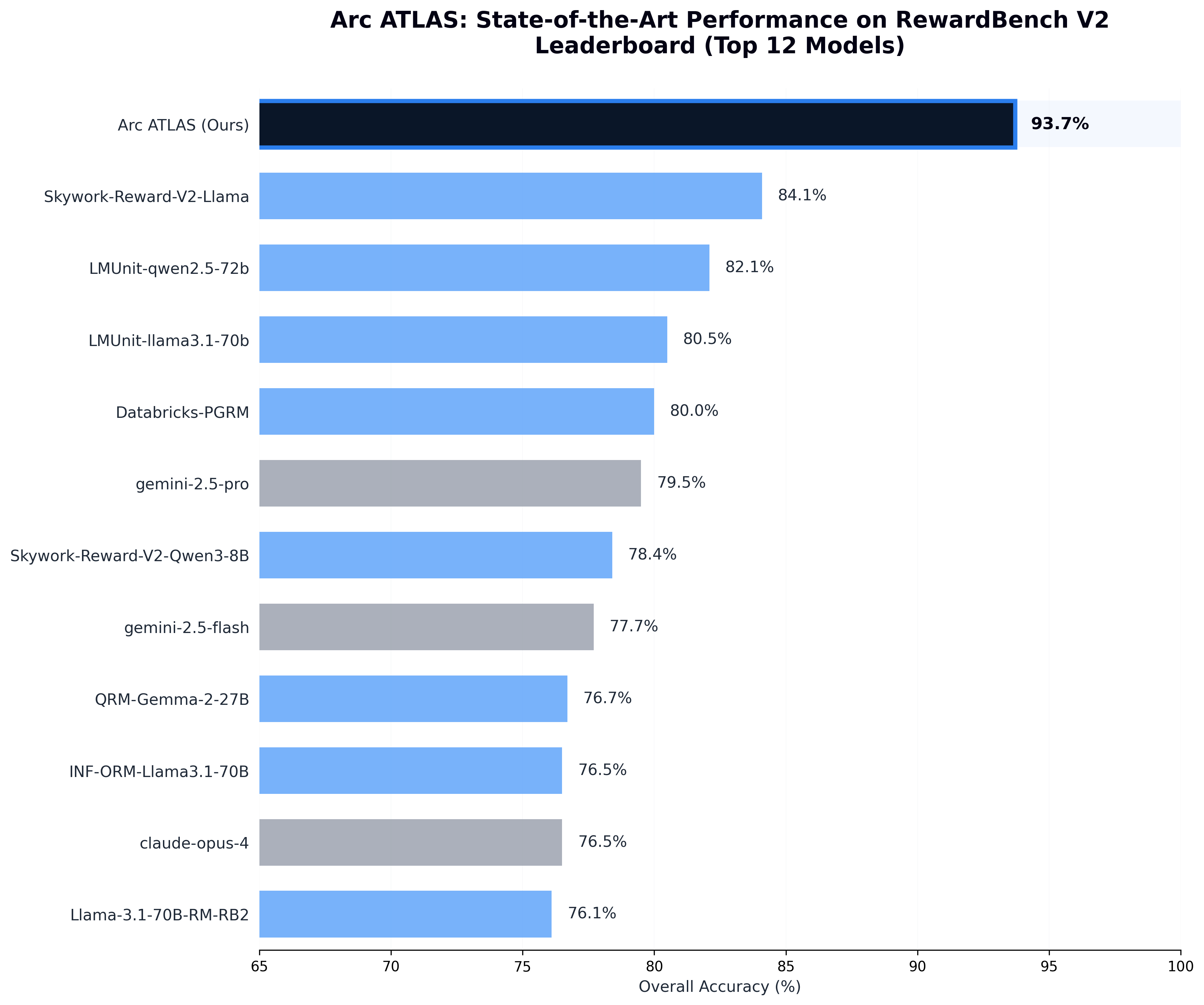
The ensemble-and-escalation architecture achieves **93.7% overall accuracy**, significantly outperforming individual models:
* **Component model** (`gemini-2.5-flash`): 77.7% on its own
* **System performance**: 93.7% (+16 points)
The architecture creates a result greater than the sum of its parts.
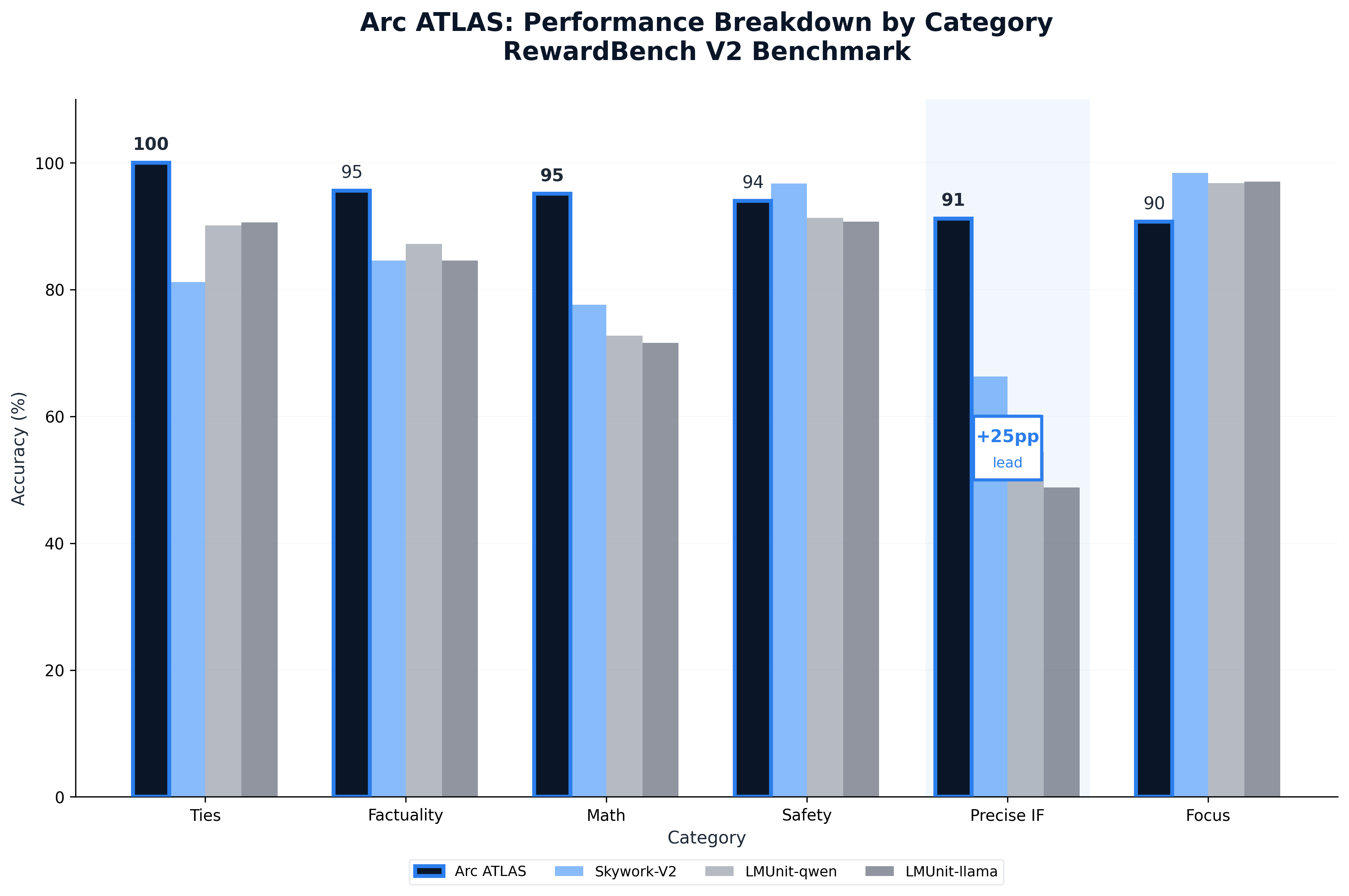
### Category Breakdown
See the complete [Reward System Technical Report](https://www.arc.computer/blog/ATLAS-Reward-System) for full analysis.
### Monitoring Rewards During Training
The training logs include reward system outputs:
```python theme={null}
# Example log entry
{
'step': 150,
'rim_rewards': {
'accuracy': 0.85,
'helpfulness': 0.72,
'process': 0.78,
'diagnostic': 0.80
},
'rim_explanations': {
'accuracy': 'Response correctly solves the problem with proper units',
'helpfulness': 'Teaching improved reasoning structure significantly'
},
'escalation_rate': 0.23 # 23% of cases went to Tier 2
}
```
Monitor these to:
* Spot prompt regressions (dropping helpfulness scores)
* Identify misconfigured thresholds (escalation rate too high/low)
* Validate teaching improvements (rising scores over time)
## Next Steps
Understand the two-tier evaluation architecture
Use the reward system to train teacher models
See how rewards flow through the production loop
Configure reward system parameters
## References
* [Reward System Technical Report](https://www.arc.computer/blog/ATLAS-Reward-System) - Complete methodology and benchmarks
* [ATLAS Technical Report](/reference/technical-report) - How rewards integrate with training
* [RewardBench V2](https://huggingface.co/spaces/allenai/reward-bench) - Benchmark leaderboard