> ## Documentation Index
> Fetch the complete documentation index at: https://docs.arc.computer/llms.txt
> Use this file to discover all available pages before exploring further.
# Training Your Own Teacher Model
> Complete guide to custom teacher model training with GRPO
**Time**: 24-48 hours (mostly unattended) • **Active setup**: 30-45 minutes • **Difficulty**: Advanced
This is the advanced path. Most users should start with our [pre-trained models](/sdk/quickstart).
Already collecting runtime traces? Stream them straight from Postgres with the `runtime_pg` data preset (`+override /data@_global_: runtime_pg db_url=...`) or stick with exported JSONL files (see [`Runtime Export Guide`](/sdk/export-traces)).
Need to customise Hydra configs? See the [`Training Configuration`](/training/configuration) guide for directory structure and override patterns.
## Who Should Train Custom Models
You need custom training if you have:
* **Proprietary knowledge** not available in public models
* **Domain-specific tasks** where generic teaching doesn't work well
* **Regulatory requirements** that prevent using pre-trained models
* **Extreme performance needs** where every percentage point matters
**What you'll need:**
* 4-8 H100 or A100 GPUs (40GB+ VRAM each)
* 2-3 days of training time
* Basic PyTorch and distributed training knowledge
* \~200GB disk space for checkpoints
## Training Pipeline Overview
 ### Runtime traces as the data source
**Direct database access** (SDK v0.1.13+) queries training sessions from PostgreSQL with reward-based filtering and selective data loading. This eliminates JSONL export intermediates and prevents schema drift:
```python theme={null}
from atlas.training_data import get_training_sessions
# Query high-quality sessions directly
sessions = get_training_sessions(
db_url="postgresql://atlas:atlas@localhost:5433/atlas",
min_reward=0.8,
status_filters=["succeeded"],
limit=10000
)
```
**JSONL export** (alternative method) is still supported for backward compatibility:
```bash theme={null}
arc-atlas --database-url postgresql://... --output traces.jsonl
```
Reference the provided Hydra config for dataset loading:
```yaml theme={null}
# src/atlas_core/configs/data/runtime_traces.yaml
make_dataset_fn:
_target_: atlas_core.data.runtime_traces.get_runtime_trace_dataset
export_path: traces/aime-batch.jsonl # Or use direct database access
eval_split_ratio: 0.1
```
Each session includes the triage dossier, adaptive summary (lane, confidence, certification flag, probe evidence), plan/step traces, persona usage/updates, reward breakdowns, and validation labels. See the [Training Data Pipeline Guide](/training/offline/training-data-pipeline) for complete API reference and filtering options.
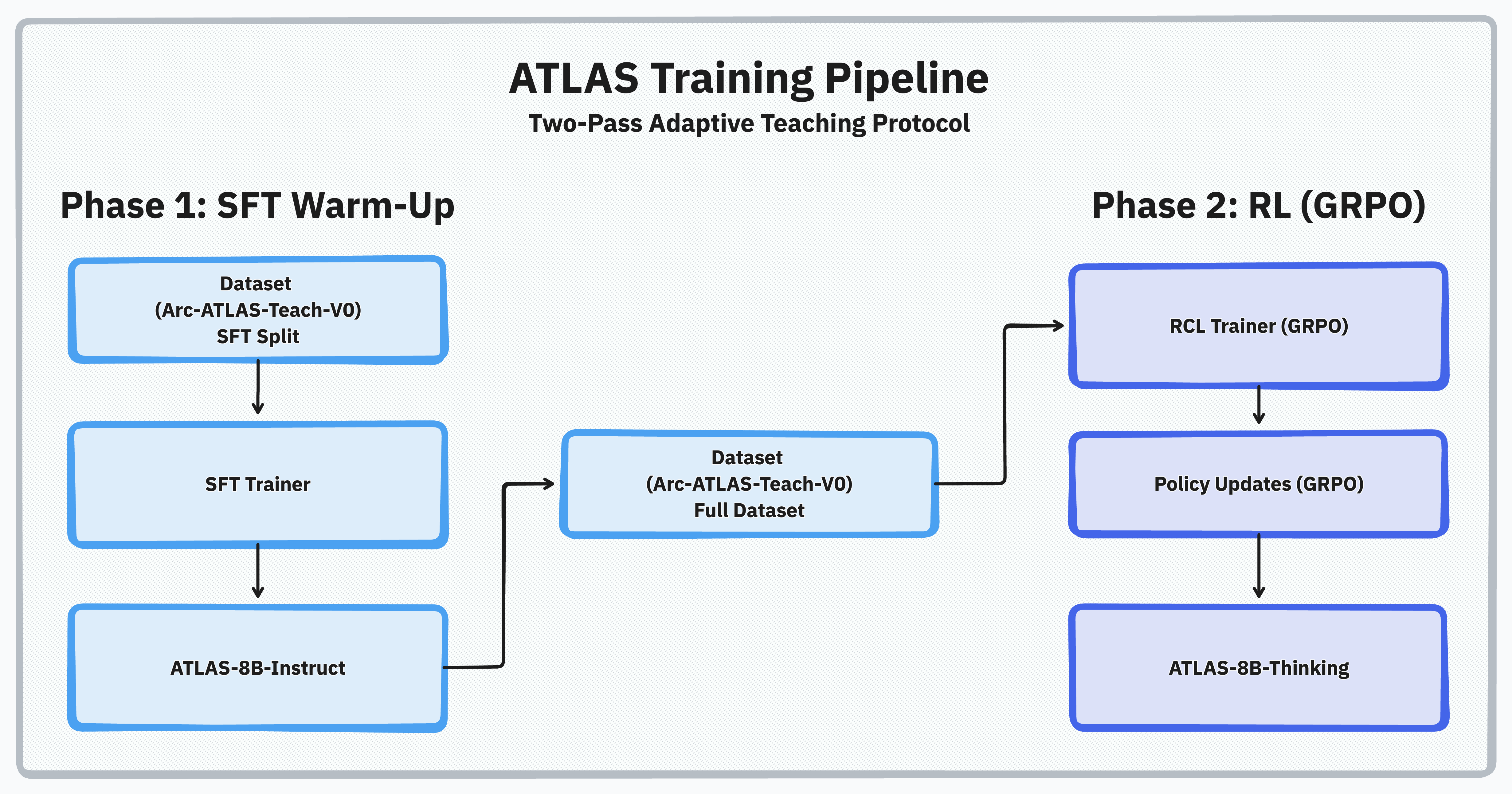
The training happens in three clear steps:
**Step 1: SFT Warmup** → Teach basic teaching patterns (4-6 hours)
**Step 2: Launch vLLM Server** → Set up fast inference (5 minutes)
**Step 3: Run GRPO** → Learn verifying-teacher behaviors for the dual-agent runtime through RL (24-36 hours)
Each step has a clear goal and success criteria.
## Step 1: SFT Warmup
**Goal**: Establish foundational teaching capabilities
### What It Does
Supervised fine-tuning teaches the model basic teaching patterns through demonstration. Think of it like a student teacher observing an expert before trying it themselves.
### Configuration Snapshot
```yaml theme={null}
# src/atlas_core/configs/recipe/teacher_sft.yaml
defaults:
- _self_
- override /model: llama3_8b
- override /data: arc_atlas_sft
- override /trainer: sft
learning_rate: 2e-5
num_train_epochs: 1
per_device_train_batch_size: 2
gradient_accumulation_steps: 8
warmup_ratio: 0.1
output_dir: checkpoints/sft
```
### Run It
```bash theme={null}
# Minimum (2 GPUs)
scripts/launch.sh 2 src/atlas_core/configs/recipe/teacher_sft.yaml \
output_dir=checkpoints/sft
# Recommended (4 GPUs)
scripts/launch.sh 4 src/atlas_core/configs/recipe/teacher_sft.yaml \
output_dir=checkpoints/sft
# Full production (8 GPUs)
scripts/launch.sh 8 src/atlas_core/configs/recipe/teacher_sft.yaml \
output_dir=checkpoints/sft
# Memory-constrained with offloading
scripts/launch.sh offload 2 src/atlas_core/configs/recipe/teacher_sft.yaml \
output_dir=checkpoints/sft
```
### Verify Success
**Check training is running:**
```bash theme={null}
tail -f checkpoints/sft/training.log | grep "loss:"
```
**Expected output:**
```
{'loss': 2.134, 'learning_rate': 1.8e-05, 'epoch': 0.15}
{'loss': 1.892, 'learning_rate': 1.5e-05, 'epoch': 0.30}
{'loss': 1.456, 'learning_rate': 1.2e-05, 'epoch': 0.50}
# Loss should decrease from ~2.0 to <1.5 over 4-6 hours
```
| Metric | Target | What It Means |
| ------------- | --------- | -------------------------- |
| Training Loss | \<1.5 | Model is learning patterns |
| Gradient Norm | \<5.0 | Training is stable |
| Duration | 4-6 hours | On 8× H100 GPUs |
## Step 2: Launch vLLM Server
**Goal**: Fast inference for RL training
### What It Does
The vLLM server provides high-throughput generation during reinforcement learning. It runs on separate GPUs from the training process for maximum efficiency.
### Run It
Atlas Core ships a lightweight launcher so you can spin up the inference stack without third-party tooling:
```bash theme={null}
CUDA_VISIBLE_DEVICES=0,1 \
python -m atlas_core.training.generation.vllm_server \
--model checkpoints/sft/final \
--port 8765 \
--tensor-parallel-size 2 \
--gpu-memory-utilization 0.9
```
If you prefer a single command that starts the vLLM servers and the GRPO job together, stick with `scripts/launch_with_server.sh src/atlas_core/configs/recipe/teacher_rcl.yaml ...`. That wrapper orchestrates `atlas_core.training.generation.vllm_server` under the hood, waits for the health checks to pass, and then launches `scripts/launch.sh` for reinforcement learning.
### Verify Success
**Check server health:**
```bash theme={null}
curl http://localhost:8765/health
```
**Expected output:**
```json theme={null}
{"status": "ok", "model_loaded": true}
```
**List available models:**
```bash theme={null}
curl http://localhost:8765/v1/models
```
**Expected output:**
```json theme={null}
{
"object": "list",
"data": [{"id": "checkpoints/sft/final", "created": 1234567890}]
}
```
**Key parameters:**
* `tensor-parallel-size`: Number of GPUs for inference (match your hardware)
* `gpu-memory-utilization`: How much VRAM to use (0.9 = 90%)
* `max-model-len`: Maximum sequence length (2048 is good default)
## Step 3: Run GRPO Training
**Goal**: Optimize teaching through reinforcement learning
### What It Does
GRPO (Group Relative Policy Optimization) trains the teacher to actually improve student performance. The reward comes from measuring if students get better when taught.
### Run It
```bash theme={null}
# Minimum (2 GPUs: 1 training, 1 vLLM)
scripts/launch_with_server.sh 1 1 src/atlas_core/configs/recipe/teacher_rcl.yaml \
model_name_or_path=checkpoints/sft/final
# Recommended (4 GPUs: 2 training, 2 vLLM)
scripts/launch_with_server.sh 2 2 src/atlas_core/configs/recipe/teacher_rcl.yaml \
model_name_or_path=checkpoints/sft/final
# Production (8 GPUs: 4 training, 4 vLLM)
scripts/launch_with_server.sh 4 4 src/atlas_core/configs/recipe/teacher_rcl.yaml \
model_name_or_path=checkpoints/sft/final
```
The first number is training GPUs, second is vLLM GPUs.
### Verify Success
**Monitor training progress:**
```bash theme={null}
tensorboard --logdir checkpoints/grpo --port 6006
```
**What to look for in TensorBoard:**
1. **Reward Mean** (chart: `train/reward`)
* Should trend upward from baseline (\~0.3-0.5 → 0.7-0.8)
* Steady increases indicate the teacher is learning effective guidance
2. **KL Divergence** (chart: `train/kl`)
* Healthy range: 0.5-2.0
* Warning if >5.0 (policy diverging too far from SFT baseline)
3. **Non-degradation Rate** (chart: `train/non_degrade_rate`)
* Target: >95% of samples improve or maintain quality
* Warning if \<90% (teaching is making students worse)
| Metric | Healthy Range | Warning Sign |
| -------------------- | ---------------------- | ---------------------- |
| Reward Mean | 0.3 → 0.8 (increasing) | Plateau or decrease |
| Non-degradation Rate | >95% | \<90% indicates issues |
| KL Divergence | 0.5-2.0 | >5.0 suggests collapse |
**Check live metrics:**
```bash theme={null}
tail -f checkpoints/grpo/training.log | grep "reward:"
```
**Expected output:**
```
{'step': 50, 'reward': 0.52, 'kl': 1.2, 'non_degrade': 0.96}
{'step': 100, 'reward': 0.61, 'kl': 1.4, 'non_degrade': 0.97}
{'step': 150, 'reward': 0.73, 'kl': 1.6, 'non_degrade': 0.98}
# Rewards should steadily increase over 24-36 hours
```
## Key Configuration Parameters
You only need to understand 3-5 core parameters:
### beta (KL divergence coefficient)
**What it does**: Controls how much the model can change from the original
**Default**: 0.04
**When to adjust**:
* Model changing too fast? → Increase to 0.06
* Training too conservative? → Decrease to 0.02
### temperature (sampling temperature)
**What it does**: Controls how creative the teaching is
**Default**: 0.7
**When to adjust**:
* Want more diverse teaching? → Increase to 0.9
* Teaching too random? → Decrease to 0.5
### learning\_rate
**What it does**: How fast the model learns
**Default**: 5e-7 (much smaller than SFT!)
**When to adjust**:
* Training too slow? → Try 1e-6
* Rewards collapsing? → Decrease to 1e-7
GRPO uses the principle-based reward system. Point to the config:
```yaml theme={null}
# src/atlas_core/configs/reward/interpretation_teaching.yaml
teacher_reward:
_target_: atlas_core.reward.interpretation.RIMReward
config_path: reward_system/interpretation_offline.yaml
```
The offline config focuses on helpfulness and process (not accuracy):
```yaml theme={null}
# reward_system/interpretation_offline.yaml
active_judges:
accuracy: false # Disable for offline training
helpfulness: true # Core reward signal
process: true # Rewards good reasoning
diagnostic: false # Disable for offline training
```
Monitor `rim_rewards` in logs to spot regressions.
```yaml theme={null}
# Full configuration options
num_generations: 32 # Samples per prompt
max_new_tokens: 512 # Response length
top_p: 0.95 # Nucleus sampling
warmup_ratio: 0.1 # LR warmup
weight_decay: 0.01 # L2 regularization
max_grad_norm: 1.0 # Gradient clipping
gradient_accumulation_steps: 4 # Effective batch size
```
## Troubleshooting
**Problem**: GPU runs out of memory during training
**Quick fixes**:
```bash theme={null}
# Reduce batch size
per_device_train_batch_size=1
# Enable gradient checkpointing
gradient_checkpointing=true
# Use DeepSpeed offloading (Accelerate config)
# scripts/launch.sh offload src/atlas_core/configs/recipe/teacher_rcl.yaml
```
**Problem**: Rewards go to zero or negative
**Quick fixes**:
```bash theme={null}
# Increase KL penalty
beta=0.1
# Reduce learning rate
learning_rate=1e-7
# Check data quality
# Verify your training data has clear improvement signals
```
**Problem**: Training can't connect to server
**Quick fixes**:
```bash theme={null}
# Check server is running
ps aux | grep vllm
# Verify port is open
lsof -i :8000
# Restart with more memory
--gpu-memory-utilization 0.95
```
**Problem**: Training slower than expected
**Quick fixes**:
```bash theme={null}
# Enable Flash Attention 2
attn_implementation=flash_attention_2
# Use torch compile (PyTorch 2.0+)
torch_compile=true
# Optimize data loading
dataloader_num_workers=4
```
## Expected Results
After successful training, you should see:
### Performance Metrics
* **Teaching efficiency**: 15.7% average accuracy improvement
* **Safety**: 97% non-degradation rate
* **Token efficiency**: 50% reduction in response length
* **Completion rate**: 31% improvement (69% → 100%)
### Training Duration
* **2 GPUs**: 4-5 days
* **4 GPUs**: 2-3 days
* **8 H100s**: 24-36 hours
### Output Artifacts
```
results/
├── sft_checkpoint/ # Phase 1 model
│ ├── pytorch_model.bin
│ └── config.json
├── rl_checkpoint/ # Phase 2 model (use this!)
│ ├── pytorch_model.bin
│ ├── config.json
│ └── trainer_state.json
└── logs/
├── train.log
└── tensorboard_events
```
## Validation
Test your trained model:
```python theme={null}
from transformers import AutoModelForCausalLM, AutoTokenizer
import torch
# Load your trained teacher
teacher = AutoModelForCausalLM.from_pretrained(
"results/rl_checkpoint",
torch_dtype=torch.float16,
device_map="auto"
)
tokenizer = AutoTokenizer.from_pretrained("results/rl_checkpoint")
# Load baseline student
student = AutoModelForCausalLM.from_pretrained(
"Qwen/Qwen3-4B-Instruct-2507",
torch_dtype=torch.float16,
device_map="auto"
)
# Test on a problem
problem = "A train travels 120 miles in 2 hours. What is its speed?"
# Get baseline (student only)
inputs = tokenizer(problem, return_tensors="pt").to(student.device)
baseline = student.generate(**inputs, max_new_tokens=100)
print(f"Baseline: {tokenizer.decode(baseline[0])}")
# Get teaching (using the atlas-sdk runtime loop)
# This gives you the enhanced response
```
## Performance Optimization
### Multi-Node Training
Scale across multiple machines:
```bash theme={null}
# Node 1 (master)
torchrun \
--nproc_per_node=8 \
--nnodes=2 \
--node_rank=0 \
--master_addr=10.0.0.1 \
atlas-core train recipe@_global_=teacher_rcl
# Node 2
torchrun \
--nproc_per_node=8 \
--nnodes=2 \
--node_rank=1 \
--master_addr=10.0.0.1 \
atlas-core train recipe@_global_=teacher_rcl
```
### DeepSpeed for Large Models
Atlas Core uses Accelerate configs (in `accelerate/`) to control DeepSpeed settings. Choose one of the shipped presets:
* `accelerate/deepspeed_zero3.yaml` (default)
* `accelerate/deepspeed_zero3_cpu_offloading.yaml` (CPU offload)
* `accelerate/deepspeed_zero1.yaml` (lighter config)
Use with:
```bash theme={null}
# Default zero3
scripts/launch.sh 8 src/atlas_core/configs/recipe/teacher_rcl.yaml
# CPU offload
scripts/launch.sh offload 8 src/atlas_core/configs/recipe/teacher_rcl.yaml
# Or explicitly via Accelerate
accelerate launch --config_file accelerate/deepspeed_zero3.yaml \
-m atlas_core.cli.train recipe@_global_=teacher_rcl
```
## Next Steps
Keep production agents improving between offline runs
Integrate your custom teacher into production
Understand how teaching effectiveness is measured
## References
* [Training Data Pipeline](/training/offline/training-data-pipeline) - Direct database access for training data
* [ATLAS Technical Report](/reference/technical-report) - Detailed methodology and ablations
* [GRPO Paper](https://arxiv.org/abs/2402.03300) - Original algorithm
* [vLLM Documentation](https://docs.vllm.ai) - Server configuration options
* [Export Runtime Traces](/sdk/export-traces) - Direct database access and JSONL export methods
* [Quickstart](/sdk/quickstart) - Collect runtime traces before training
### Runtime traces as the data source
**Direct database access** (SDK v0.1.13+) queries training sessions from PostgreSQL with reward-based filtering and selective data loading. This eliminates JSONL export intermediates and prevents schema drift:
```python theme={null}
from atlas.training_data import get_training_sessions
# Query high-quality sessions directly
sessions = get_training_sessions(
db_url="postgresql://atlas:atlas@localhost:5433/atlas",
min_reward=0.8,
status_filters=["succeeded"],
limit=10000
)
```
**JSONL export** (alternative method) is still supported for backward compatibility:
```bash theme={null}
arc-atlas --database-url postgresql://... --output traces.jsonl
```
Reference the provided Hydra config for dataset loading:
```yaml theme={null}
# src/atlas_core/configs/data/runtime_traces.yaml
make_dataset_fn:
_target_: atlas_core.data.runtime_traces.get_runtime_trace_dataset
export_path: traces/aime-batch.jsonl # Or use direct database access
eval_split_ratio: 0.1
```
Each session includes the triage dossier, adaptive summary (lane, confidence, certification flag, probe evidence), plan/step traces, persona usage/updates, reward breakdowns, and validation labels. See the [Training Data Pipeline Guide](/training/offline/training-data-pipeline) for complete API reference and filtering options.
The training happens in three clear steps:
**Step 1: SFT Warmup** → Teach basic teaching patterns (4-6 hours)
**Step 2: Launch vLLM Server** → Set up fast inference (5 minutes)
**Step 3: Run GRPO** → Learn verifying-teacher behaviors for the dual-agent runtime through RL (24-36 hours)
Each step has a clear goal and success criteria.
## Step 1: SFT Warmup
**Goal**: Establish foundational teaching capabilities
### What It Does
Supervised fine-tuning teaches the model basic teaching patterns through demonstration. Think of it like a student teacher observing an expert before trying it themselves.
### Configuration Snapshot
```yaml theme={null}
# src/atlas_core/configs/recipe/teacher_sft.yaml
defaults:
- _self_
- override /model: llama3_8b
- override /data: arc_atlas_sft
- override /trainer: sft
learning_rate: 2e-5
num_train_epochs: 1
per_device_train_batch_size: 2
gradient_accumulation_steps: 8
warmup_ratio: 0.1
output_dir: checkpoints/sft
```
### Run It
```bash theme={null}
# Minimum (2 GPUs)
scripts/launch.sh 2 src/atlas_core/configs/recipe/teacher_sft.yaml \
output_dir=checkpoints/sft
# Recommended (4 GPUs)
scripts/launch.sh 4 src/atlas_core/configs/recipe/teacher_sft.yaml \
output_dir=checkpoints/sft
# Full production (8 GPUs)
scripts/launch.sh 8 src/atlas_core/configs/recipe/teacher_sft.yaml \
output_dir=checkpoints/sft
# Memory-constrained with offloading
scripts/launch.sh offload 2 src/atlas_core/configs/recipe/teacher_sft.yaml \
output_dir=checkpoints/sft
```
### Verify Success
**Check training is running:**
```bash theme={null}
tail -f checkpoints/sft/training.log | grep "loss:"
```
**Expected output:**
```
{'loss': 2.134, 'learning_rate': 1.8e-05, 'epoch': 0.15}
{'loss': 1.892, 'learning_rate': 1.5e-05, 'epoch': 0.30}
{'loss': 1.456, 'learning_rate': 1.2e-05, 'epoch': 0.50}
# Loss should decrease from ~2.0 to <1.5 over 4-6 hours
```
| Metric | Target | What It Means |
| ------------- | --------- | -------------------------- |
| Training Loss | \<1.5 | Model is learning patterns |
| Gradient Norm | \<5.0 | Training is stable |
| Duration | 4-6 hours | On 8× H100 GPUs |
## Step 2: Launch vLLM Server
**Goal**: Fast inference for RL training
### What It Does
The vLLM server provides high-throughput generation during reinforcement learning. It runs on separate GPUs from the training process for maximum efficiency.
### Run It
Atlas Core ships a lightweight launcher so you can spin up the inference stack without third-party tooling:
```bash theme={null}
CUDA_VISIBLE_DEVICES=0,1 \
python -m atlas_core.training.generation.vllm_server \
--model checkpoints/sft/final \
--port 8765 \
--tensor-parallel-size 2 \
--gpu-memory-utilization 0.9
```
If you prefer a single command that starts the vLLM servers and the GRPO job together, stick with `scripts/launch_with_server.sh src/atlas_core/configs/recipe/teacher_rcl.yaml ...`. That wrapper orchestrates `atlas_core.training.generation.vllm_server` under the hood, waits for the health checks to pass, and then launches `scripts/launch.sh` for reinforcement learning.
### Verify Success
**Check server health:**
```bash theme={null}
curl http://localhost:8765/health
```
**Expected output:**
```json theme={null}
{"status": "ok", "model_loaded": true}
```
**List available models:**
```bash theme={null}
curl http://localhost:8765/v1/models
```
**Expected output:**
```json theme={null}
{
"object": "list",
"data": [{"id": "checkpoints/sft/final", "created": 1234567890}]
}
```
**Key parameters:**
* `tensor-parallel-size`: Number of GPUs for inference (match your hardware)
* `gpu-memory-utilization`: How much VRAM to use (0.9 = 90%)
* `max-model-len`: Maximum sequence length (2048 is good default)
## Step 3: Run GRPO Training
**Goal**: Optimize teaching through reinforcement learning
### What It Does
GRPO (Group Relative Policy Optimization) trains the teacher to actually improve student performance. The reward comes from measuring if students get better when taught.
### Run It
```bash theme={null}
# Minimum (2 GPUs: 1 training, 1 vLLM)
scripts/launch_with_server.sh 1 1 src/atlas_core/configs/recipe/teacher_rcl.yaml \
model_name_or_path=checkpoints/sft/final
# Recommended (4 GPUs: 2 training, 2 vLLM)
scripts/launch_with_server.sh 2 2 src/atlas_core/configs/recipe/teacher_rcl.yaml \
model_name_or_path=checkpoints/sft/final
# Production (8 GPUs: 4 training, 4 vLLM)
scripts/launch_with_server.sh 4 4 src/atlas_core/configs/recipe/teacher_rcl.yaml \
model_name_or_path=checkpoints/sft/final
```
The first number is training GPUs, second is vLLM GPUs.
### Verify Success
**Monitor training progress:**
```bash theme={null}
tensorboard --logdir checkpoints/grpo --port 6006
```
**What to look for in TensorBoard:**
1. **Reward Mean** (chart: `train/reward`)
* Should trend upward from baseline (\~0.3-0.5 → 0.7-0.8)
* Steady increases indicate the teacher is learning effective guidance
2. **KL Divergence** (chart: `train/kl`)
* Healthy range: 0.5-2.0
* Warning if >5.0 (policy diverging too far from SFT baseline)
3. **Non-degradation Rate** (chart: `train/non_degrade_rate`)
* Target: >95% of samples improve or maintain quality
* Warning if \<90% (teaching is making students worse)
| Metric | Healthy Range | Warning Sign |
| -------------------- | ---------------------- | ---------------------- |
| Reward Mean | 0.3 → 0.8 (increasing) | Plateau or decrease |
| Non-degradation Rate | >95% | \<90% indicates issues |
| KL Divergence | 0.5-2.0 | >5.0 suggests collapse |
**Check live metrics:**
```bash theme={null}
tail -f checkpoints/grpo/training.log | grep "reward:"
```
**Expected output:**
```
{'step': 50, 'reward': 0.52, 'kl': 1.2, 'non_degrade': 0.96}
{'step': 100, 'reward': 0.61, 'kl': 1.4, 'non_degrade': 0.97}
{'step': 150, 'reward': 0.73, 'kl': 1.6, 'non_degrade': 0.98}
# Rewards should steadily increase over 24-36 hours
```
## Key Configuration Parameters
You only need to understand 3-5 core parameters:
### beta (KL divergence coefficient)
**What it does**: Controls how much the model can change from the original
**Default**: 0.04
**When to adjust**:
* Model changing too fast? → Increase to 0.06
* Training too conservative? → Decrease to 0.02
### temperature (sampling temperature)
**What it does**: Controls how creative the teaching is
**Default**: 0.7
**When to adjust**:
* Want more diverse teaching? → Increase to 0.9
* Teaching too random? → Decrease to 0.5
### learning\_rate
**What it does**: How fast the model learns
**Default**: 5e-7 (much smaller than SFT!)
**When to adjust**:
* Training too slow? → Try 1e-6
* Rewards collapsing? → Decrease to 1e-7
GRPO uses the principle-based reward system. Point to the config:
```yaml theme={null}
# src/atlas_core/configs/reward/interpretation_teaching.yaml
teacher_reward:
_target_: atlas_core.reward.interpretation.RIMReward
config_path: reward_system/interpretation_offline.yaml
```
The offline config focuses on helpfulness and process (not accuracy):
```yaml theme={null}
# reward_system/interpretation_offline.yaml
active_judges:
accuracy: false # Disable for offline training
helpfulness: true # Core reward signal
process: true # Rewards good reasoning
diagnostic: false # Disable for offline training
```
Monitor `rim_rewards` in logs to spot regressions.
```yaml theme={null}
# Full configuration options
num_generations: 32 # Samples per prompt
max_new_tokens: 512 # Response length
top_p: 0.95 # Nucleus sampling
warmup_ratio: 0.1 # LR warmup
weight_decay: 0.01 # L2 regularization
max_grad_norm: 1.0 # Gradient clipping
gradient_accumulation_steps: 4 # Effective batch size
```
## Troubleshooting
**Problem**: GPU runs out of memory during training
**Quick fixes**:
```bash theme={null}
# Reduce batch size
per_device_train_batch_size=1
# Enable gradient checkpointing
gradient_checkpointing=true
# Use DeepSpeed offloading (Accelerate config)
# scripts/launch.sh offload src/atlas_core/configs/recipe/teacher_rcl.yaml
```
**Problem**: Rewards go to zero or negative
**Quick fixes**:
```bash theme={null}
# Increase KL penalty
beta=0.1
# Reduce learning rate
learning_rate=1e-7
# Check data quality
# Verify your training data has clear improvement signals
```
**Problem**: Training can't connect to server
**Quick fixes**:
```bash theme={null}
# Check server is running
ps aux | grep vllm
# Verify port is open
lsof -i :8000
# Restart with more memory
--gpu-memory-utilization 0.95
```
**Problem**: Training slower than expected
**Quick fixes**:
```bash theme={null}
# Enable Flash Attention 2
attn_implementation=flash_attention_2
# Use torch compile (PyTorch 2.0+)
torch_compile=true
# Optimize data loading
dataloader_num_workers=4
```
## Expected Results
After successful training, you should see:
### Performance Metrics
* **Teaching efficiency**: 15.7% average accuracy improvement
* **Safety**: 97% non-degradation rate
* **Token efficiency**: 50% reduction in response length
* **Completion rate**: 31% improvement (69% → 100%)
### Training Duration
* **2 GPUs**: 4-5 days
* **4 GPUs**: 2-3 days
* **8 H100s**: 24-36 hours
### Output Artifacts
```
results/
├── sft_checkpoint/ # Phase 1 model
│ ├── pytorch_model.bin
│ └── config.json
├── rl_checkpoint/ # Phase 2 model (use this!)
│ ├── pytorch_model.bin
│ ├── config.json
│ └── trainer_state.json
└── logs/
├── train.log
└── tensorboard_events
```
## Validation
Test your trained model:
```python theme={null}
from transformers import AutoModelForCausalLM, AutoTokenizer
import torch
# Load your trained teacher
teacher = AutoModelForCausalLM.from_pretrained(
"results/rl_checkpoint",
torch_dtype=torch.float16,
device_map="auto"
)
tokenizer = AutoTokenizer.from_pretrained("results/rl_checkpoint")
# Load baseline student
student = AutoModelForCausalLM.from_pretrained(
"Qwen/Qwen3-4B-Instruct-2507",
torch_dtype=torch.float16,
device_map="auto"
)
# Test on a problem
problem = "A train travels 120 miles in 2 hours. What is its speed?"
# Get baseline (student only)
inputs = tokenizer(problem, return_tensors="pt").to(student.device)
baseline = student.generate(**inputs, max_new_tokens=100)
print(f"Baseline: {tokenizer.decode(baseline[0])}")
# Get teaching (using the atlas-sdk runtime loop)
# This gives you the enhanced response
```
## Performance Optimization
### Multi-Node Training
Scale across multiple machines:
```bash theme={null}
# Node 1 (master)
torchrun \
--nproc_per_node=8 \
--nnodes=2 \
--node_rank=0 \
--master_addr=10.0.0.1 \
atlas-core train recipe@_global_=teacher_rcl
# Node 2
torchrun \
--nproc_per_node=8 \
--nnodes=2 \
--node_rank=1 \
--master_addr=10.0.0.1 \
atlas-core train recipe@_global_=teacher_rcl
```
### DeepSpeed for Large Models
Atlas Core uses Accelerate configs (in `accelerate/`) to control DeepSpeed settings. Choose one of the shipped presets:
* `accelerate/deepspeed_zero3.yaml` (default)
* `accelerate/deepspeed_zero3_cpu_offloading.yaml` (CPU offload)
* `accelerate/deepspeed_zero1.yaml` (lighter config)
Use with:
```bash theme={null}
# Default zero3
scripts/launch.sh 8 src/atlas_core/configs/recipe/teacher_rcl.yaml
# CPU offload
scripts/launch.sh offload 8 src/atlas_core/configs/recipe/teacher_rcl.yaml
# Or explicitly via Accelerate
accelerate launch --config_file accelerate/deepspeed_zero3.yaml \
-m atlas_core.cli.train recipe@_global_=teacher_rcl
```
## Next Steps
Keep production agents improving between offline runs
Integrate your custom teacher into production
Understand how teaching effectiveness is measured
## References
* [Training Data Pipeline](/training/offline/training-data-pipeline) - Direct database access for training data
* [ATLAS Technical Report](/reference/technical-report) - Detailed methodology and ablations
* [GRPO Paper](https://arxiv.org/abs/2402.03300) - Original algorithm
* [vLLM Documentation](https://docs.vllm.ai) - Server configuration options
* [Export Runtime Traces](/sdk/export-traces) - Direct database access and JSONL export methods
* [Quickstart](/sdk/quickstart) - Collect runtime traces before training